
A replica that keeps running after the migration ends
Conversion Studio runs change data capture to shorten a cutover, then stops. Replication is the same capture as a standing replica: a source table set streamed into a target database for as long as you need it, with lag, rejects and schema changes surfaced in the product instead of in a log file.
Load once, then follow the log
Pick source, target and tables
A SQL Server or Oracle source, a SQL Server or Oracle target, and the tables to carry. Each table needs a key; a table without one is refused rather than replicated with a chance of duplicates after a restart.
Build the target and load it
Tables, keys and indexes are created on the target, or existing tables are emptied and reused. Foreign keys and triggers are held back while the target is a replica. Across engines you review the mapping Conversion Studio proposes before anything is created.
Stream from the checkpoint
The Executor reads committed changes from the source log (SQL Server change tracking tables, Oracle LogMiner) and applies them in commit order. The checkpoint lives on the target, so a restart resumes where it stopped.
What you watch while it streams
Seconds behind the source, inserts, updates and deletes applied, rows the target refused, and a history sparkline per replica. States are plain words: Loading, Streaming, Retrying, Paused, Failed, Promoted.
A lag threshold, a reject count, and a recipient list. Alerts reach the people on the list in the product, by email or Slack, and a workspace webhook signed with HMAC-SHA256 if you route them elsewhere.
Every table carries a fingerprint. When the source structure changes, the replica pauses and shows the diff. Accept it if it cannot affect the replicated rows, or resync the table from the source as it is now.
Same-engine replicas compare rows by key, up to 20,000 per table. Cross-engine replicas compare row counts. Rows changed within the lag may differ only because they are on their way.
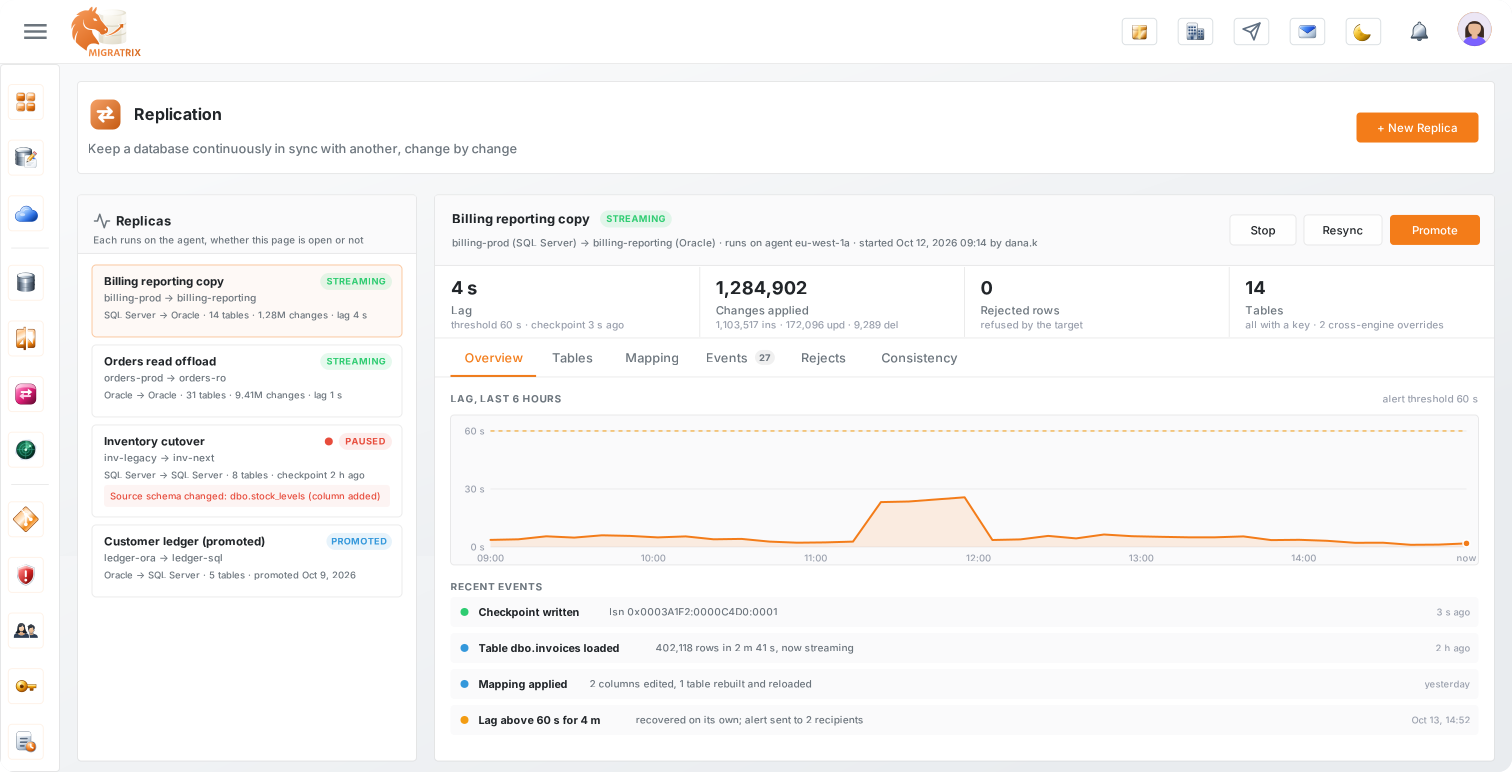
The buttons an operator actually presses
Resync
Empty one table on the target and load it again while the others keep streaming, or rebuild the whole replica after a schema change.
Retry a reject
A row the target refused is listed with its reason. Retry re-reads the current source row by key and applies it, or dismiss it if it should not land.
Edit the mapping
Cross-engine replicas keep their column overrides on the replica itself. Change a type or rename a column, and only the affected tables are rebuilt and reloaded.
Promote
When the target becomes the system of record, Promote applies the held-back constraints, drops the source capture, and stops the replica. The record of it stays in the list.
What is built, and what is not
SQL Server and Oracle, on both sides
Replication reads from and writes to SQL Server and Oracle. Same-engine replicas copy the structure as it is. SQL Server to Oracle and Oracle to SQL Server go through a reviewed mapping. PostgreSQL, MySQL and MongoDB are Conversion Studio targets for a cutover, not Replication targets today.
The source database has to expose its log
SQL Server needs change data capture enabled on the database and the Agent service running. Oracle needs ARCHIVELOG mode and supplemental logging, which your DBA turns on. The wizard checks the source and tells you what is missing before it creates anything.
DDL is not replicated
A structural change on the source pauses the replica with the diff instead of being replayed on the target. You decide: accept, or resync.
It is part of the Scale plan
Replication is included in Scale. Conversion Studio's change capture for a cutover stays where it is; Replication is the standing replica on top of it.
What you set when you create a replica
| Field | Default |
|---|---|
| Source and target | A connection, database and schema on each side. Targets are limited to environments where you may manage replicas. |
| Tables | Any table with a primary or unique key. "Select all with a key" is one click; keyless tables stay greyed out with the reason. |
| Target tables | Create them and load, or reuse existing tables (emptied first). Foreign keys and triggers are held back until Promote. |
| Batch and poll | Transactions per batch and a poll interval in milliseconds. Both editable later. |
| Alerts | Lag threshold in seconds, reject threshold in rows, and the workspace users who receive them. |
| Where state lives | The definition is encrypted on the Executor. Checkpoint, events and the run lease sit in a _migratrix schema on the target database. Nothing row-level reaches the Migratrix cloud; it only receives status and metrics. |
| Who can create one | Replica permissions are granted per environment: read, operate, manage, admin. Owners and admins have them by default. |
Stop the cutover run and continue as a replica
Hand over from Conversion Studio
A Conversion Studio run with change capture can be stopped and continued as a replica from its checkpoint, on the same capture. The target already holds the data; the replica streams on from there.
Reporting copies and read offload
A same-engine replica of selected production tables for reporting, with the lag visible to the people who read from it.
Run both systems for a while
Keep Oracle authoritative while SQL Server fills from it, or the reverse, until you are ready to promote and make the target the system of record.